Leif Le
September 6, 2025
15 min read
Redux best practice in modern React
Let’s go step by step so you deeply understand Redux and then we’ll implement it in a Next.js + TypeScript project for a profile feature.
1. Core Redux Concepts (in depth)
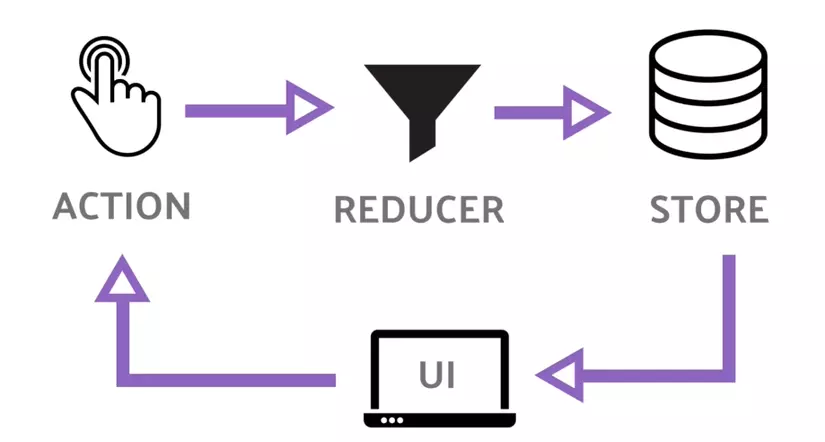
Redux is a state management library. The key ideas:
- Single Source of Truth:
- All global state is kept in a single store.
- State is Read-only:
- You don’t mutate state directly. You dispatch actions.
- Changes are made with pure functions (reducers):
- Reducers take (state, action) and return a new state.
Redux Entities
- Store – Holds the state tree.
import { configureStore } from "@reduxjs/toolkit";
export const store = configureStore({
reducer: {
// your reducers go here
},
});
- State – A plain object representing your app’s data.
interface ProfileState {
name: string;
email: string;
avatar?: string;
}
- Actions – Objects that describe what happened.
{ type: "profile/updateName", payload: "Quang Le" }
- Reducers – Pure functions that update state.
const profileReducer = (state, action) => { ... }
- Dispatch – The only way to trigger a state change.
dispatch(updateName("Quang Le"));
- Selectors – Functions to read data from the store.
const name = useSelector((state: RootState) => state.profile.name);
2. Why Redux with Next.js?
- Server + Client Data: Sometimes you fetch user data (profile) server-side and want it globally accessible.
- Cross-page state: If multiple pages need profile info, Redux avoids prop-drilling.
- Predictable state changes: Easy debugging with Redux DevTools.
3. Implementation – Profile State in Next.js + TS
We’ll use Redux Toolkit (RTK) since it’s the modern way.
Step 1 – Install
npm install @reduxjs/toolkit react-redux
Step 2 – Setup Store
store.ts
import { configureStore } from "@reduxjs/toolkit";
import profileReducer from "./profileSlice";
export const store = configureStore({
reducer: {
profile: profileReducer,
},
});
// Types for TS
export type RootState = ReturnType<typeof store.getState>;
export type AppDispatch = typeof store.dispatch;
Step 3 – Create Profile Slice
profileSlice.ts
import { createSlice, PayloadAction } from "@reduxjs/toolkit";
interface ProfileState {
name: string;
email: string;
avatar?: string;
}
const initialState: ProfileState = {
name: "",
email: "",
avatar: "",
};
const profileSlice = createSlice({
name: "profile",
initialState,
reducers: {
setProfile: (state, action: PayloadAction<ProfileState>) => {
return action.payload;
},
updateName: (state, action: PayloadAction<string>) => {
state.name = action.payload;
},
updateEmail: (state, action: PayloadAction<string>) => {
state.email = action.payload;
},
updateAvatar: (state, action: PayloadAction<string>) => {
state.avatar = action.payload;
},
},
});
export const { setProfile, updateName, updateEmail, updateAvatar } =
profileSlice.actions;
export default profileSlice.reducer;
Step 4 – Provide Store in Next.js
In Next.js 13/14 App Router:
providers.tsx
"use client";
import { Provider } from "react-redux";
import { store } from "./store";
export function ReduxProvider({ children }: { children: React.ReactNode }) {
return <Provider store={store}>{children}</Provider>;
}
In layout.tsx:
import { ReduxProvider } from "./store/providers";
export default function RootLayout({ children }: { children: React.ReactNode }) {
return (
<html lang="en">
<body>
<ReduxProvider>{children}</ReduxProvider>
</body>
</html>
);
}
Step 5 – Use Redux in Components
Profile.tsx
"use client";
import { useSelector, useDispatch } from "react-redux";
import { RootState, AppDispatch } from "../store/store";
import { updateName, updateEmail } from "../store/profileSlice";
export default function Profile() {
const profile = useSelector((state: RootState) => state.profile);
const dispatch = useDispatch<AppDispatch>();
return (
<div className="p-4 border rounded">
<h2 className="text-xl font-bold">Profile</h2>
<p>Name: {profile.name}</p>
<p>Email: {profile.email}</p>
<button
onClick={() => dispatch(updateName("Quang Le"))}
className="mt-2 px-3 py-1 bg-blue-500 text-white rounded"
>
Update Name
</button>
<button
onClick={() => dispatch(updateEmail("quang@example.com"))}
className="mt-2 px-3 py-1 bg-green-500 text-white rounded"
>
Update Email
</button>
</div>
);
}
4. Server-side Integration (optional but powerful)
In Next.js, you might fetch user profile server-side and then hydrate Redux.
Example (Server Component → Client Component):
// page.tsx
import Profile from "./Profile";
async function getUserProfile() {
const res = await fetch("https://api.example.com/me", { cache: "no-store" });
return res.json();
}
export default async function Page() {
const profile = await getUserProfile();
return <Profile initialProfile={profile} />;
}
Then in Profile.tsx, you could dispatch setProfile(initialProfile) when mounting.